
Web application in IIS7 is getting stopped everytime

You might have come across situation where the web application is getting stopped every time and you had to do iisreset again and again. The web application gets stopped every time because of some errors and when the error count crosses the error limit, at that time the web application gets stopped. In order to fix this issue i have come across a solution which will never stops the web application by its own.

Follow the following steps:
  1. Go to Internet Information Services 7(IIS 7)


2.Select the web application
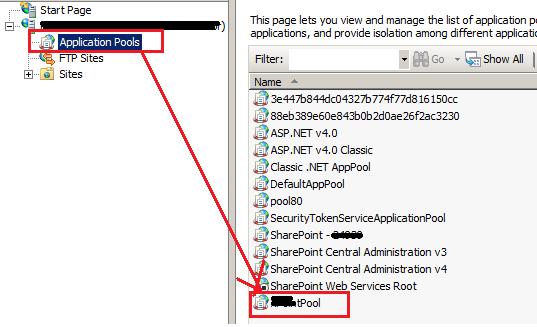


3.Right click on the web application and click on the Advanced Settings.


4.In the Opened window find for "Rapid-Fail Protection". In this section , the property named "Enable", set the value to "False".


Thus we can fix this issue.


Hope this may help some one

Cheers
Pradeepa Achar

Comments

Popular posts from this blog

[Solution] :How to not serialize the __type property on JSON object

While working on ajax- webservice , most of the time we prefer return value from web service method should be in JSON format . If we expect a web service method to return the value as JSON object then it will display few information about the source code through the __type property. Also this property is additional load for response. We ideally need to avoid this property Have a look at the below image in which it is returning JSON object which has my custom properties along with __type property. Here i have used burp suite penetration testing tool to test the loophole in our software. Through fiddler i have got the information about request /response  and wanted to hide error message which gets generated from exception. Usually stack trace may allow hackers to  retrieve error message which  contains code related information by using which hacker can easily find the loophole to hack the function.So when  exception arises hacker should not be...

error occurred in deployment step 'recycle iis application pool' :object reference not set to an instance of an object

While deploying using Visual studio, we may get an error "error occurred in deployment step 'recycle iis application pool' :object reference not set to an instance of an object" Solution:  Don't get  panic ..Simply restart the visual studio with the solution which you wanted to deploy on to the site This may help some one. -cheers pradeepa achar
Hi Buddies,                    While doing some research i have got a   blog which has some information regarding SharePoint2007 and SharePoint 2010.Just Go through that link.You will like it as it explains from the installation of Sharepoint.